

Ask What ChatGPT Can do for Math. II.


Ask not what your country can do for you—
ask what you can do for your country.
John F. Kennedy, 1961
1. A PROMPT FOR INTERACTIVE EDITING
ChatGPT excels at editing. It can correct both grammar and style. It is really simple: use the prompt: edit: and paste the text to be edited. ChatGPT returns the edited text.
The deluxe version of editing is interactive editing. You edit sentence by sentence, ChatGPT displays your original sentence, the corrected version, and the reason for the change.
Then there is a prompt
Accept change? (y/n):
If I type y, ChatGPT permanently applies the editing, if I type n, the original sentence is unchanged.
At the end, I get the corrected text with the changes I approved.
Here is a prompt that tells ChatGPT to interactively proofread and edit a document, sentence by sentence, with user confirmation before applying each change.
You are an expert editor. I paste a latex file.
Perform the following workflow:
- Read the entire text from the uploaded file including text in verbatim
- Edit only text Go sentence by sentence. For each sentence:
- Display in order:
- Original sentence
- Edited sentence (your improved version for clarity, grammar, and style)
- The reason for the change (in 1–2 sentences)
- Display in order:
- Then prompt me:
Accept change? (y/n):
- Wait for my input:
- If I type y, apply the editing to the sentence.
- If I type n, keep the original sentence unchanged.
- Continue this process until all sentences have been reviewed.
- At the end, output the edited document in full.
Keep the process strictly interactive:
only show one sentence at a time,
wait for my yes/no input, and apply the changes cumulatively.
Here is a sample dialogue:
Original:
Numerous diagrams help visualize the concepts and results.
Edited:
Numerous diagrams help readers visualize the concepts and results.
Reason:
Adding readers clarifies who benefits from the diagrams, making the sentence slightly more explicit and natural in academic prose.
Accept change? (y/n):
Type y to accept and n to skip.
Remember: ChatGPT is a predictive language model. Given a sequence of words, it produces the word that is statistically likely to follow. So it is best at editing.
2. I HATE LOG FILES
I am working on a math paper. When I try to typeset it, I get an error message in the log file. Sometimes the message is cryptic, and I do not know what to do. ChatGPT can help: copy the last two paragraphs before the error together with the error message—ChatGPT will usually identify the cause and suggest a fix.
If there are no fatal errors, the paper will be typeset, although the log file may still contain diagnostics worth examining.
What a log file contains. A LaTeX run produces a detailed transcript. The most important items are:
- Engine and format information. The log begins by identifying the engine and LATEX format, for example:
This is pdfTeX, Version 3.141592653-2.6-1.40.27 (TeX Live 2025
(preloaded format=pdflatex) restricted \write18 enabled.
entering extended mode
(./ask.tex
LaTeX2e <2024-11-01> patch level 2
L3 programming layer <2025-01-18>
- Classes, packages, and files loaded. Every class, package, font definition, and graphics file appears as a parenthesized filename, such as (amsart.cls), (amsmath.sty), or (newlattice.sty). This allows you to verify exactly what the document uses.
- Layout diagnostics. Overfull and underfull boxes report lines that extend into the margin or have poor spacing. For example: Overfull \hbox(5.9pt too wide) in paragraph at lines 264–264.
- Warnings. Undefined references or labels, unresolved citations, and package-specific is- sues appear here. For instance: LaTeX Warning: Reference ‘S:editing’ on page 13 undefined.
- Page production and font usage. As pages are shipped out, the log lists them as [1]n[2] [3], etc. Near the end, it reports which fonts were embedded in the PDF.
- Final summary. A successful run concludes with a line such as:
Output written on ask.pdf (6 pages, 356422 bytes)
Using ChatGPT to summarize a log file.
Upload the log file and ask simply:
Report
ChatGPT produces a structured summary:
- Which engine and format were used,
- What classes and packages were loaded,
- All layout diagnostics,
- Any font or microtype warnings,
- Resource usage and final status of the run.
The result is a compact, readable overview of the entire typesetting process—much easier than searching manually through thousands of lines.
2. A COLOURING SCHEME FOR THEOREM-LIKE ENVIRONMENTS
Mathematical documents use the same font for all theorem-like environments, making it hard to distinguish the structure of the paper at a glance.
In this section, with the help of ChatGPT, I create a sty file, GCS.sty. Invoke it in your article, by placing
\usepackage{GCS}
in the preamble. This is a great demonstration of how capable ChatGPT is to write complicated tex code. (The sty file is about two pages long.)
The complete GCS.sty file is available online:
https://www.icloud.com/iclouddrive/0f6TeZT0WjrQvmUKN0X3HAatQ#Data_files
It also contains the sample file matharticle.tex to illustrate the use of GSC.sty.
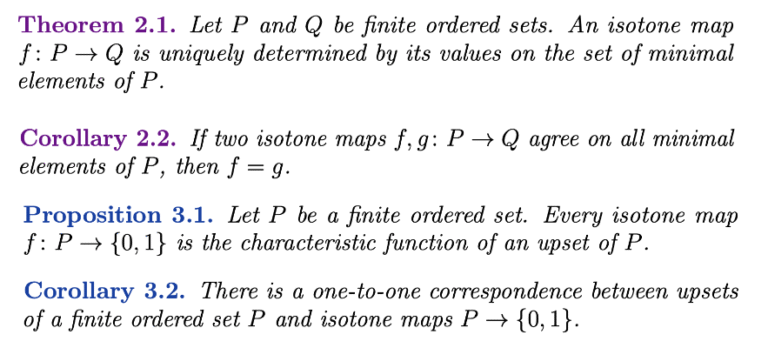
GCS.sty introduces a colouring scheme, GSC, that gives the document a clearer visual hierarchy.
Still, the colouring is modest enough not to interfere with the reading of the article.
I introduce two coloured styles:
- Purple for theorems or corollaries to theorems;
- Blue for lemmas, propositions, and their corresponding
Both styles keep the body of the environment in italics, as in the standard amsthm layout, but the headings are coloured. The effect is subtle and highly readable: major results stand out immediately, while supporting results appear in a lighter visual key.
Here is the prompt:
Write a sty file that defines theorem, lemma, proposition if they have not been defined. It defines Tcorollary and Lcollorary as corollaries. The author chooses whether a corollary is a Tcorollary (a corollary to a theorem) or an Lcollorary (a corollary to a lemma or proposition). The header of a theorem and Tcorollary is coloured purple. The header of a lemma, proposition, and Lcorollary is coloured blue. All theorem-like environments use the same counter: theorem.
The result is GSC.sty.
Why colour? I use colour here not as decoration but as structure.
- Purple highlights the main mathematical milestones.
- Blue quietly marks the supporting lemmas and propositions.
Here are some examples:
GSC.sty, contains the line
\definecolor{gcsPurple}{rgb}{0.75,0.00,0.90}
Change 0.75 if you want a different level of brightness for purple.


